Vulnerability Event System
Identifying vulnerabilities is only the beginning—the critical question is how your organization responds. A structured event system provides the framework for teams to take appropriate actions, ensuring every security finding receives a deliberate, documented response rather than being lost in alert fatigue.
The Vulnerability Event System refers to structured actions and workflows teams use to respond to identified vulnerabilities—create issues, document decisions, change states, accept risks—while maintaining audit trails and integrating with existing development workflows.
Core Response Actions
DevGuard implements four primary response actions corresponding to the vulnerability management workflow:
1. Create Issue Tracker Tickets
Transform abstract security findings into concrete work items tracked through normal development workflows.
How it works: DevGuard integrates with GitHub Issues, GitLab Issues, and Jira. Creating a ticket generates an issue containing vulnerability details, risk assessment, affected components, remediation recommendations, and links back to DevGuard.
When to use: Create tickets for vulnerabilities requiring remediation work—patching dependencies, refactoring code, or implementing compensating controls.
Example: A high-risk SQL injection vulnerability is identified. You create a GitHub Issue that gets labeled “security” and assigned to your backend team with upgrade instructions included.
DevGuard maintains bidirectional synchronization. When you create tickets from DevGuard, closing the issue in your tracker can automatically update vulnerability status. DevGuard can auto-close tickets when vulnerabilities are fixed through dependency updates.
2. Mark as False Positive
Document that a finding doesn’t apply to your application, preventing repeated investigation.
How it works: Document why the vulnerability isn’t exploitable in your environment. This assessment is stored and can be exported in VEX documents.
When to use:
- Version matching errors incorrectly report your software as vulnerable
- Cross-ecosystem confusion (vulnerability affects different package with same name)
- Scanner misidentified components
Example: Scanner reports critical vulnerability in “utils” package. Investigation reveals your npm “utils” is unrelated to the vulnerable Python PyPI “utils”. You mark it false positive with justification “Cross-ecosystem confusion.”
Important: Reserve false positive for incorrect vulnerability reports. If the vulnerability exists but isn’t exploitable in your deployment, use “Not Affected” status instead.
3. Change Vulnerability State
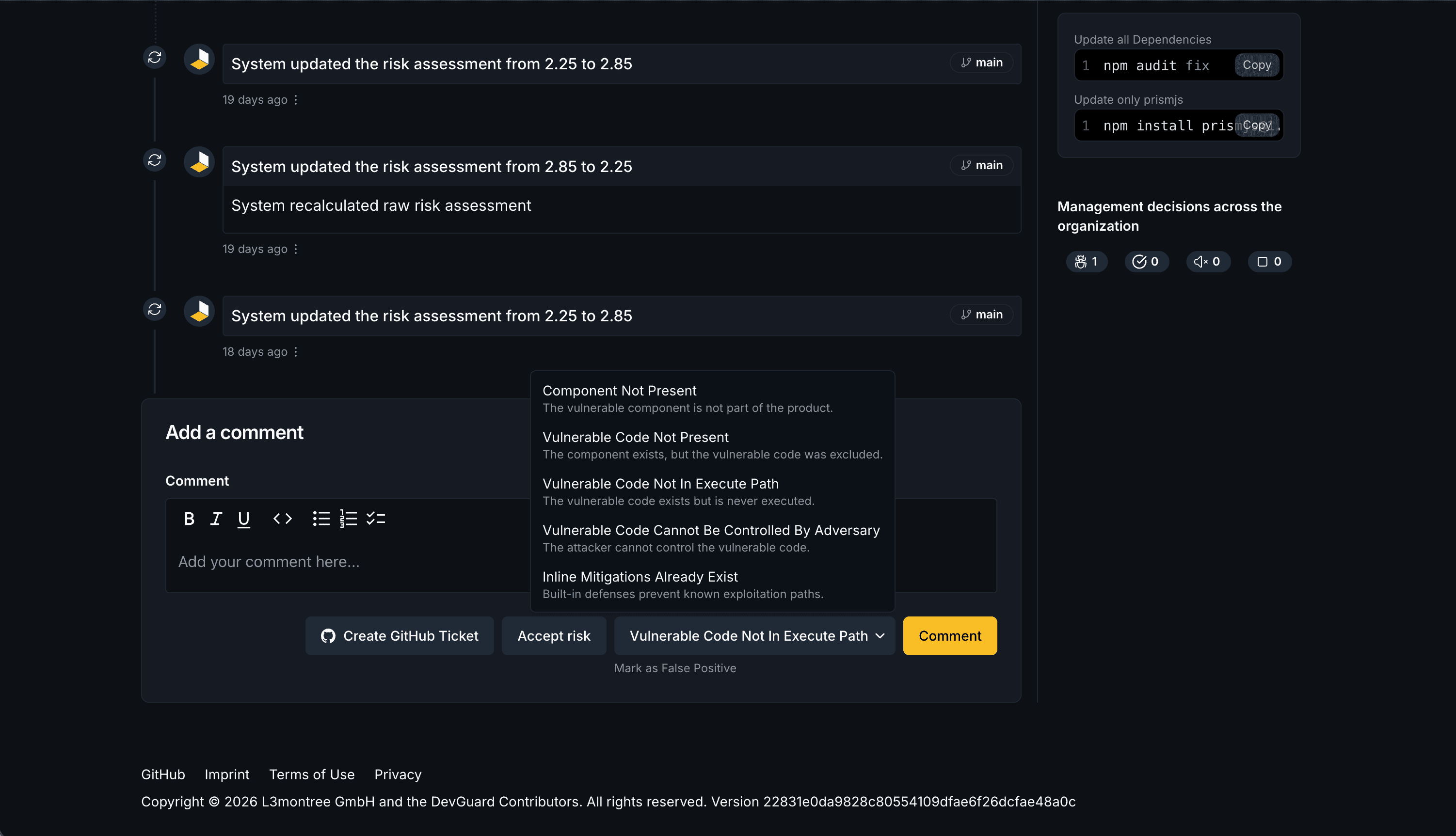
Vulnerability states communicate how findings impact your application based on the VEX standard.
Not Affected: Vulnerability exists in dependencies but doesn’t impact your application. Requires justification:
- Vulnerable Code Not Present: Your version predates the vulnerability
- Vulnerable Code Not In Execute Path: Your application never calls vulnerable functions
- Inline Mitigations Exist: Compensating controls prevent exploitation
- Component Not Affected: Only affects configurations you don’t use
Under Investigation: Team is actively analyzing impact. Transitional state requiring eventual resolution.
Fixed: Vulnerability remediated through patching or code changes.
Example: A vulnerability affects LDAP authentication in a security library. Your application uses only JWT validation and never initializes LDAP. You change state to “Not Affected” with justification “Vulnerable Code Not In Execute Path.”
4. Accept Risk
Formally document business decisions to operate with known vulnerabilities when immediate remediation isn’t feasible.
How it works: Document why remediation isn’t immediately feasible, what compensating controls exist, the acceptance time period, and who authorized the decision.
When to use:
- No patch available and compensating controls adequately reduce risk
- Patching would break critical business functionality
- Effort exceeds actual risk
- Remediation requires extensive work scheduled for future release
Example: Vulnerability exists in legacy payment library with no vendor support. Migration requires six months. You accept risk with documented controls: network segmentation, WAF rules, enhanced monitoring. Acceptance expires when migration completes.
Risk acceptance should be temporary whenever possible. Set review dates to reassess—circumstances change, new exploits emerge, and what was acceptable six months ago may no longer be acceptable today.
VEX Statement Generation
After assessing vulnerabilities, communicate your security posture to stakeholders through standardized VEX documents.
What it includes: VEX statements export your vulnerability assessments—which findings are Fixed, Not Affected, Under Investigation, or have accepted risk—with complete justifications and supporting documentation.
Who needs it: Customers asking about specific CVEs, compliance auditors requiring proof of vulnerability management, downstream consumers needing to understand your security status, and partners conducting security assessments.
Benefits: Machine-readable VEX documents enable automated security assessments throughout your supply chain. They reduce duplicate work—customers don’t need to independently assess vulnerabilities you’ve already analyzed—and build trust through transparent communication.
DevGuard automatically generates VEX documents from your vulnerability assessments. Export these as part of your release process to ensure stakeholders always have current vulnerability status information.
Workflow Integration
Bidirectional Synchronization
DevGuard maintains connections between vulnerability findings and tracking tickets:
DevGuard → Issue Tracker: Creating tickets populates issue details; risk changes update descriptions; new threat intelligence can trigger priority updates.
Issue Tracker → DevGuard: Closing tickets updates vulnerability status; ticket comments synchronize back; assignments reflect ownership.
Automatic State Detection
Fixed Detection: Upgrading to patched versions automatically transitions vulnerabilities to Fixed state and can auto-close associated tickets.
Regression Detection: Rolling back to vulnerable versions reopens findings as Affected.
Risk Updates: Multiple daily vulnerability database updates recalculate risk scores. Significant increases can automatically create or update tickets.

Related Documentation
- Vulnerability Lifecycle - Understanding the complete vulnerability management process
- Mitigation Strategies - Responding to different vulnerability types
- False Positive Detection - Understanding false positive root causes